Help
Find the sentence Last Loonie is showing you, or the thing that happened. Each one opens with a tap.
Sign-in codes
The code didn’t arrive
Codes go only to the address your invite went to, and only once sync is on for it. Check that address and its spam folder. A code works for 15 minutes and five tries; after that, ask for another. You can ask up to ten times an hour.
The six digits don’t match
Choose Not me. Start again on the new device from Email me a code. If they differ a second time, stop and email us: something may be sitting between the two devices, and your budget should not be handed over.
I can’t find the sync setting
It’s inside the Backups card on the Settings page, under Sync across devices. There is no Settings → Sync.
Adding and losing devices
"Start on your computer" or "Nothing to join yet"
One screen, three causes, none of them a fault:
- sync isn’t on yet for that address, so turn it on at your computer first;
- you typed a different address from the one you turned sync on with;
- your request was declined with Not me, or sat for more than ten minutes and expired.
Start again from Email me a code, and say Yes, let it in on the other device while the new one is still on its waiting screen.
"Waiting for your computer", and nothing happens
Open Last Loonie on the device you already use, and leave the new one on its waiting screen. The request reaches an open app within about fifteen seconds and lasts ten minutes. If it expired, start again from Email me a code.
"That account is full"
Five devices are already on the account. At your computer, open Settings → Backups → Sync across devices, find the one you no longer use under Devices, click Sign out beside it, and try the new device again.
A change hasn’t shown up on my other device
Devices catch up when Last Loonie is opened, comes back to the front, or you change something. They don’t update while the app is closed. Open it on the device that’s behind.
I lost a device
From a device you still have, sign the lost one out: Settings → Backups → Sync across devices, then Sign out beside it under Devices. It can no longer send or receive changes. Whatever was on it stays there, so if your bank is connected, also revoke the connection at SimpleFIN Bridge.
I lost every device
Use your recovery kit, at a computer: Settings → Backups → Sync across devices → Add this device, then Use my recovery kit instead. Type your address and the key, and click Let this device in. The phone’s pairing screen has no recovery-kit option.
Without the kit, nobody can open the copy we hold, and we can’t reset it. "Start over on this address" begins again from the device you are holding.
"Start over on this address"
On the waiting screen, under the digits. It’s the way out of one dead end: no device left to say yes, and no recovery kit.
It emails you a fresh code first. Then Start over permanently discards the copy we hold, which nothing can open anyway, and starts sync again from the device you are holding. It leaves alone the budget on that device and every backup file you’ve saved. If a backup file holds the budget you actually want, restore it on this device first.
Budgets, backups and the recovery kit
"Two budgets"
The device you’re adding has been used on its own, so it has a budget of its own. The two can’t be combined, because every line would appear twice. Choose one:
- Use the budget from my computer is the usual answer. The phone’s budget downloads as a backup file first, then the synced one replaces it.
- Use this phone’s budget everywhere replaces the synced budget on every device, with no undo. Only choose it if the phone has the newer budget.
See this screen
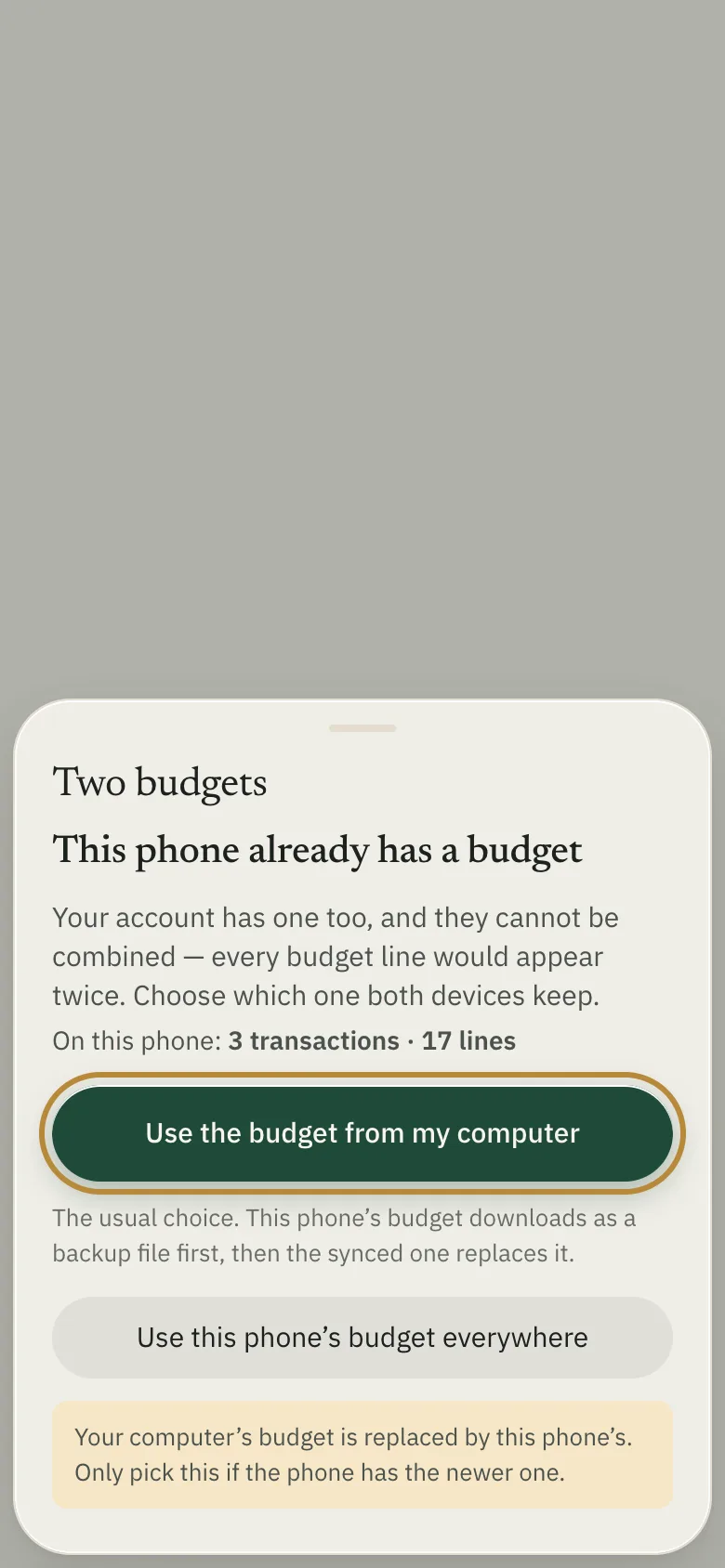
A second computer asks the same question as Use the synced budget and Replace it with this device’s.
The recovery kit
The recovery key opens your synced budget when there is no device left to say yes. Normally you never need it, because adding a device means saying yes on one you already use. Keep the file, or a written copy, somewhere private and away from your devices.
If you lose every device and the kit, nobody can open the copy we hold. Not you, and not us. There is no reset.
I clicked Skip for now
The key can’t be shown again. Sync carries on normally, and the kit only matters if every device you use is lost at once. Until then, keep more than one device approved and keep a backup file.
Restoring a file replaced my budget
That is what restoring does: the file becomes the budget on that device. If you downloaded a copy first, restore that copy to go back. If sync is on, the restored budget is what your other devices follow.
I erased my phone and my computer is empty too
While a phone is paired, Erase everything on this phone erases every device, and that can’t be undone. If you downloaded a copy when the sheet offered it, or have a backup file from Settings → Backups, restore it at your computer with Restore from a file… and the other devices follow. Without a file, the budget is gone.
The bank connection
I lost the setup token
SimpleFIN shows each token once. Go back to My account, click New app connection under Apps, and make another one.
My bank isn’t in the tiles
The tiles are American banks. Type your bank’s name into the search box above them.
A transaction hasn’t arrived
SimpleFIN checks your bank about once a day, and many banks take a couple of days to post a purchase. Open Last Loonie again later in the week. Opening it more often won’t speed it up: it asks at most once an hour.
Been away for a while? Your bank may need you to sign in again at SimpleFIN. If Last Loonie shows a message saying so, sign in at SimpleFIN Bridge, then open Last Loonie. It fetches the missing days, back as far as 90 days.
Connecting from my phone
A bank is connected at your computer. Once it is, sync carries the connection to your phone, and the phone fetches new transactions on its own whenever you open it.
Stopping the bank connection
Revoke it at SimpleFIN Bridge. That stops it everywhere at once, including on a device you’ve lost. Disconnect… in Last Loonie only forgets the key on your devices; SimpleFIN keeps sharing until you revoke it there.
Still stuck
Email hello@lastloonie.ca and tell us which screen you’re on and what you pressed last. We never need your recovery key, a sign-in code, a setup token or a backup file, so please don’t send them.
Your budget: app.lastloonie.ca · Bank connection: bridge.simplefin.org · Questions: hello@lastloonie.ca